Anthropic’s Claude now lets anyone build and share Mac and Windows apps without coding
 Daniel Levi
Posted On November 24, 2026
Anthropic is bringing AI-generated software to the desktop. The company announced Tuesday that Claude users can now build, install, and share personalized Mac and Windows applications without writing a single line of code, opening up software development to millions of people with little or no programming experience.
The new feature, called “Install as app,” is rolling out in beta across all Claude plans. It allows users to turn Claude artifacts into desktop applications with their own icons, windows, notifications, and access to operating system features.
Rather than downloading another productivity app or paying for software packed with features they rarely use, users can describe what they need to Claude and build a personalized application.
“Starting today, you can use Claude artifacts to create, run, and share desktop apps,” Anthropic said in its announcement.
The launch comes at a turbulent time for Anthropic on Wall Street. As we reported Monday, the company’s shares fell another 4.2% to $85.18 during afternoon trading, approaching its $83 IPO price just days after completing a record-breaking $93.5 billion public offering. The selloff has raised questions about AI valuations and whether leading AI companies can turn technological advances into sustainable revenue.
The desktop app launch offers a glimpse of how Anthropic could make Claude more integral to users’ daily work, creating new reasons to keep using the service beyond occasional conversations with its chatbot.
From AI-generated artifacts to desktop applications
Claude artifacts were originally introduced to create and interact with content such as charts, websites, visualizations, and interactive tools within Claude. Anthropic is now extending that capability beyond the chatbot interface.
Users can describe an application, test it as an artifact, and install it directly from Claude’s Share menu. Anthropic handles traditional software packaging and code signing for them.
The applications can connect to external services, including email and calendars, and use Claude to perform AI-assisted tasks. Changes to the original artifact automatically update the installed application.
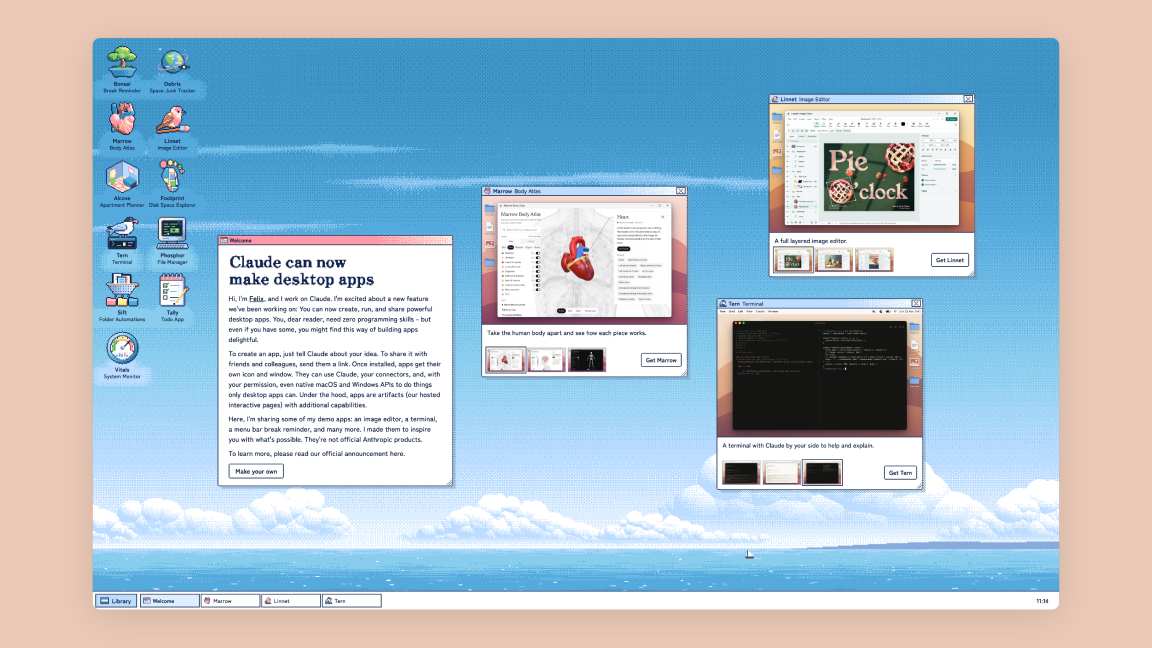
Anthropic employees have already experimented with the feature, creating applications ranging from a layered image editor and file manager to an AI-assisted terminal and a system performance monitor.
For independent founders and small businesses, the implications could be significant. A business owner could create a custom inventory tracker, a freelancer could build a client management tool, or an entrepreneur could develop a personalized dashboard without hiring a software developer.
There are limitations. According to Anthropic, installed applications require an internet connection and an active Claude session. AI requests made through the applications count against the user’s existing Claude plan limits.
That usage model could give Anthropic a commercial advantage. Instead of interacting with Claude through a single chat window, customers could use multiple personalized applications throughout their working day, potentially increasing demand for paid subscriptions.
What installed Claude apps can do
The applications go beyond simple productivity tools. Installed apps can send desktop notifications, add items to the Mac menu bar or Windows system tray, and interact with local computer resources based on user-approved permissions. Administrators on Claude’s Team and Enterprise plans can manage application permissions and full computer access across their organizations.
Felix Rieseberg, one of the developers behind the feature, shared his firsthand experience building desktop applications with Claude in a post on X.
“I’ve been using it to build my own versions of terminals, file managers, video editors, comms tools, and even little desktop pets. These apps can do native things, like adding menu bar items, creating transparent windows, or sending notifications. Update to the latest version of Claude for macOS & Windows to try it out.”
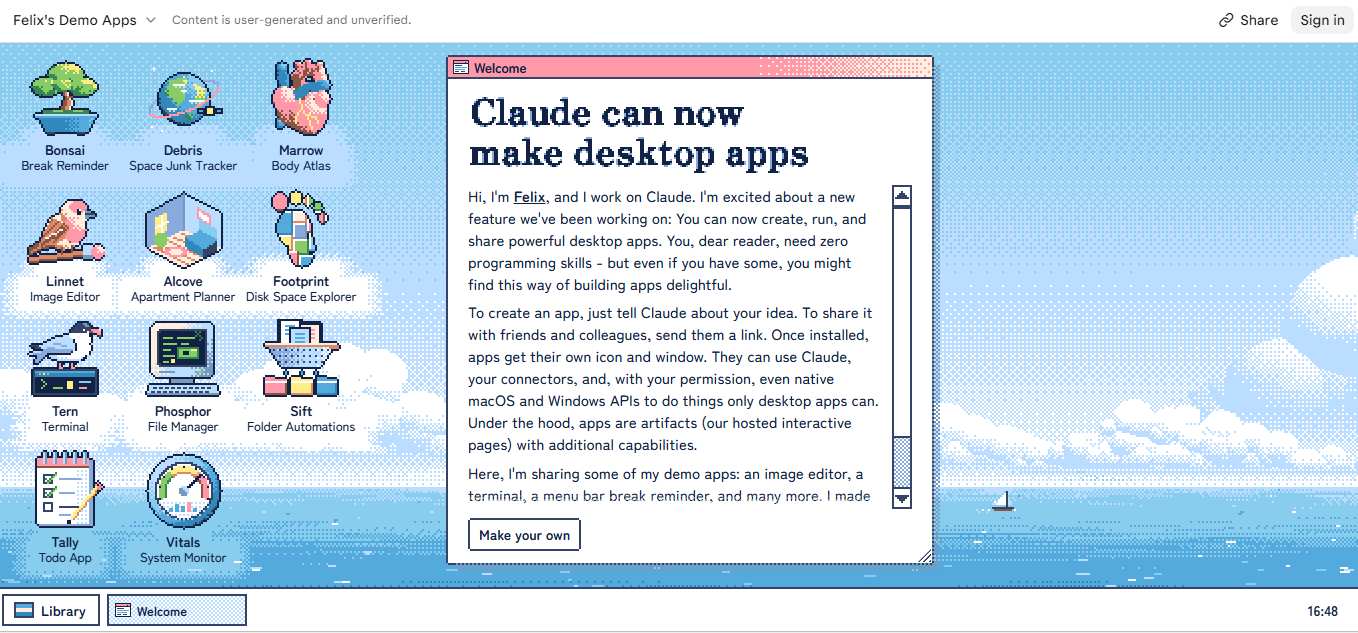
Felix is not alone. Other Anthropic employees have already put the technology to work. Their creations include Linnet, a fully layered image editor; Phosphor, a visually distinctive file manager; and Sift, an AI-assisted file organization tool that follows custom folder rules.
Other examples include Tern, a terminal with a built-in Claude assistant, and Vitals, a desktop utility for monitoring computer performance.
Readers interested in exploring the technology can find more demo applications created by an Anthropic engineer.
These examples point to a broader shift in personal computing. Instead of adapting their workflows to commercially available software, users can now create applications around how they already work.
That flexibility comes with security risks. The same permissions that let an application organize files or monitor system performance could also let it run programs, modify files, or delete data.
The security risks of giving AI-generated apps computer access
Creating desktop software through natural language introduces a less glamorous but equally significant challenge: security.
Anthropic has introduced three permission levels, ranging from browser-like restrictions to extensive computer access. Depending on the permissions granted, applications can execute programs, modify local files, and delete data without requesting approval for every action.
“Anthropic doesn’t review apps before you install them,” the company warned.
Full computer access is restricted to applications users create themselves or those developed within their organization under eligible business plans. Software updates trigger renewed permission requests, though externally hosted components can change without generating another approval request.
For people without programming experience, assessing whether AI-generated software is safe may prove considerably harder than creating it.
That tension captures one of the biggest challenges facing the emerging AI software industry. Making applications easier to build does not automatically make them secure, reliable, or suitable for commercial use.
Anthropic’s latest release points to a future in which people increasingly create their own software instead of searching for existing applications that fit their needs.
The next AI competition may be less about which chatbot answers questions best and more about which platform becomes the foundation for the software people use every day.
Below is a video of Claude in action.