OpenAI launches GPT-6 with Intelligent UI, turning ChatGPT into an interactive visual experience
 Daniel Levi
Posted On October 7, 2026
Daniel Levi
Posted On October 7, 2026
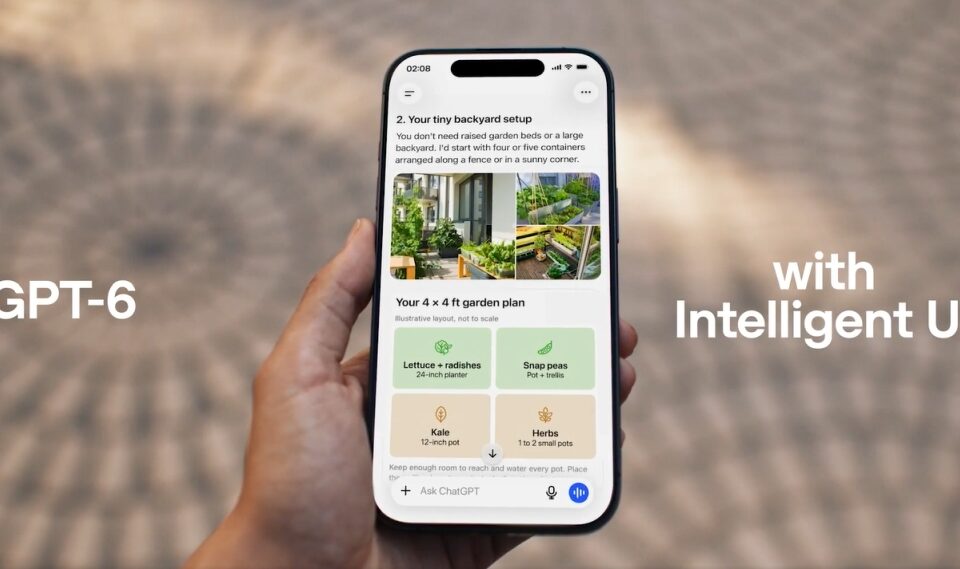
OpenAI has launched GPT-6 with a new feature called Intelligent UI, letting ChatGPT turn ordinary text responses into interactive visual experiences, complete with charts, diagrams, buttons, calculators, and custom-built tools. The update marks a major change in how people interact with ChatGPT, moving the chatbot beyond traditional question-and-answer conversations into something closer to software that builds itself around what users need.
Announced Wednesday, the release brings GPT-6 to ChatGPT’s more than 1.2 billion weekly users, starting with paid subscribers before reaching free users on Thursday.
“ChatGPT just got a lot more visual—introducing Intelligent UI. Intelligent UI allows ChatGPT to answer quickly with fully interactive user interfaces that make everyday answers more visual. It makes learning complex topics easier, and it quickly creates tools to solve a task right in the moment,” OpenAI said in a post on X.
ChatGPT just got a lot more visual—introducing Intelligent UI.
Intelligent UI allows ChatGPT to answer quickly with fully interactive user interfaces that make everyday answers more visual.
It makes learning complex topics easier, and it quickly creates tools to solve a task right in the moment.
Oh, and also…GPT-6 is coming to ChatGPT. For everyone.
— ChatGPT (@ChatGPT) October 7, 2026
The biggest change isn’t simply a smarter AI model. It’s what ChatGPT can now do with its answers.
Instead of describing how a seven-speed bicycle works in several paragraphs, ChatGPT can generate an interactive diagram that lets users explore its frame, wheels, drivetrain, brakes, and handlebars. Ask it to split a restaurant bill, and it can create a working calculator directly inside the conversation.
For OpenAI, the update represents a shift from an AI assistant that primarily explains things to one that can create usable interfaces on demand.
Intelligent UI turns ChatGPT answers into interactive tools
Until now, most interactions with AI chatbots have followed a familiar pattern: users ask questions, and the chatbot responds with text, sometimes accompanied by images, tables, or links.
Intelligent UI changes that format by allowing GPT-6 to decide how an answer should appear based on the question.
With Intelligent UI, users can ask ChatGPT to break down the components of a bicycle, plan a dinner, put together a wardrobe, or split a restaurant bill using a receipt. Instead of lengthy text explanations, they get interactive visual responses that make information easier to understand, explore, and use.
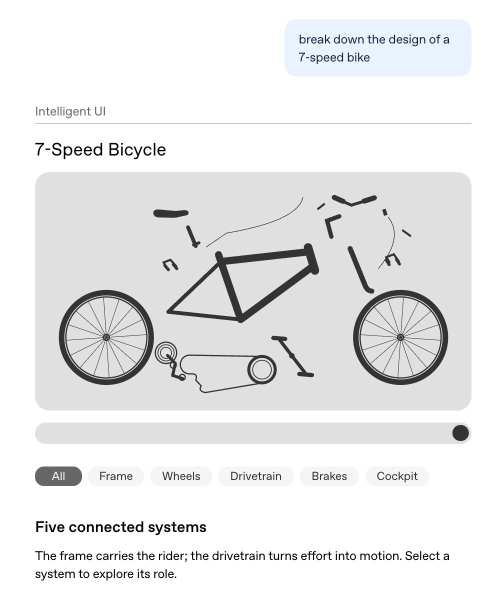
Image credit: OpenAI
A user planning a road trip might receive an interactive map with suggested stops. Someone building a wardrobe could explore clothing combinations visually. A student studying statistics could adjust values in an interactive demonstration to see how mathematical concepts work.
ChatGPT can create retirement savings calculators, playable games, and other small tools without requiring users to leave the conversation or write code.
The system doesn’t generate a visual interface for every request. Simple questions can still receive straightforward text answers.
Behind the scenes, OpenAI developed a library of native interface components and a compiler that displays them as GPT-6 generates its response. This allows interactive elements to appear progressively rather than forcing users to wait for a complete answer.
The company trained GPT-6 to decide on presentation, layout, and interaction, including recognizing when visual elements add little value.
The approach points to a bigger ambition: software that adapts to users instead of requiring people to learn a separate interface for every task.
It could change how people use AI for education, personal finance, shopping, planning, and everyday problem-solving. It remains to be seen how consistently these automatically generated interfaces perform across more demanding tasks.
GPT-6 delivers faster answers without waiting for reasoning to finish
Intelligent UI isn’t the only major change arriving with GPT-6.
OpenAI has changed how ChatGPT handles questions that require extended reasoning. Previously, users often had to wait for a reasoning model to finish processing a request before receiving an answer.
GPT-6 can now begin responding as it continues thinking, adding findings and details to an answer already appearing on the screen.
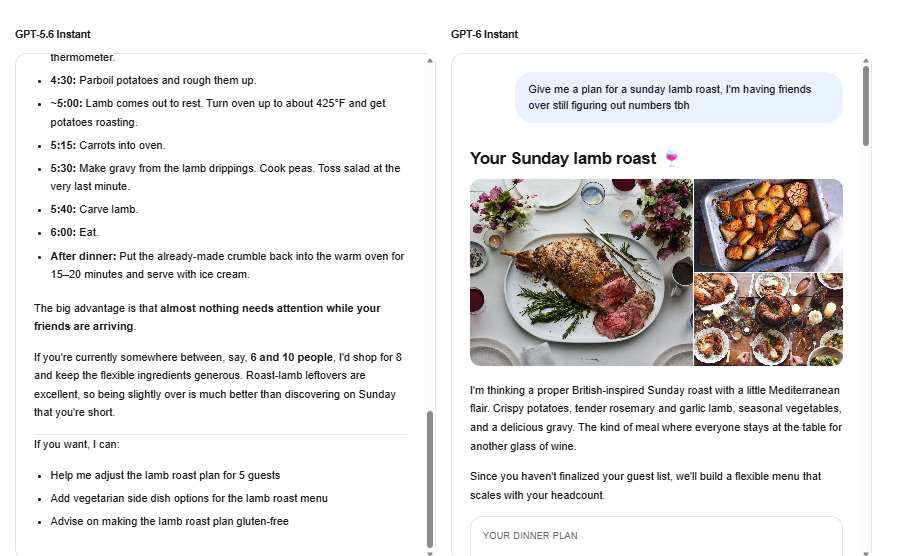
The goal is to reduce the time users spend staring at a loading indicator, particularly during research and more involved tasks.
According to OpenAI’s internal testing, GPT-6 Instant begins answering questions requiring web searches **44% sooner on average than GPT-5.6 Instant**. That measurement refers to how quickly an answer starts appearing, not the total time needed to complete it.
The company reports that GPT-6 Extra High can begin responding in roughly the same time as GPT-5.6 Medium, yet achieve a higher overall score than GPT-5.6 Extra High on an internal evaluation of everyday, multi-step tasks.
These are company-reported results, and performance may vary by request.
OpenAI says GPT-6 has improved its ability to determine when web searches are needed, find supporting information, and communicate its limitations.
GPT-6 rollout begins today as OpenAI rethinks how people use software
GPT-6 with Intelligent UI begins rolling out globally on October 7 to ChatGPT Plus, Pro, Business, and Enterprise subscribers, with Free and Go users gaining access starting October 8. Enterprise availability depends on workplace administrator settings.
The update introduces GPT-6 Sol for paid tiers and GPT-6 Luna for Free and Go users. Both models are built for everyday conversations.
The rollout applies to the Chat experience in ChatGPT. The models used by Work and Codex remain unchanged.
Beyond the new features, OpenAI is betting on a different future for software.
For decades, people have had to learn how applications work, from menus and settings to buttons and workflows. Intelligent UI makes it possible to reverse that relationship.
Instead of opening separate applications to plan a trip, compare purchases, analyze expenses, or study a difficult subject, users could describe what they want to accomplish and receive an interface built around that task.
OpenAI acknowledges that Intelligent UI remains a work in progress, particularly in how the model chooses layouts and interactive elements.
The bigger question is whether AI-generated interfaces can become reliable enough to replace some of the fixed applications people use every day.
If that happens, GPT-6 could mark a turning point in computing, moving ChatGPT from a chatbot that answers questions to an AI assistant that creates the software experience needed to act on those answers.
The shift is simple but significant: Instead of people learning how to use software, software could learn how to work for people.